onboard credit card payments are almost here!
Santa Cruz METRO will launch Tap2Cruz, a contactless fare payment technology for riders, in Summer 2026.
Contactless-enabled bank cards (Visa, Mastercard, Discover, and American Express) and mobile wallets (Apple Pay, Google Pay, Samsung Pay, and Fitbit Pay) are accepted.
Cash and Splash Pass are still accepted, as well.
To use Tap2Cruz, use the same method of contactless payment on each trip and tap the payment reader as you board the bus. If traveling in a group, each rider must pay separately. Don’t use the same contactless payment for multiple riders.
Contactless payments are safe and secure by using a one-time code for every transaction.
Frequently asked questions
- What type of payment methods are accepted on METRO’s contactless payment system?
METRO accepts Visa, Mastercard, Discover, and American Express contactless-enabled bank cards and mobile wallets. Accepted mobile wallets include Apple Pay & Google Pay, either on your phone or wearable.
- How do I know if I have a contactless-enabled bank card?
Cards that are contactless-enabled have the symbol shown below (on the front or the back):
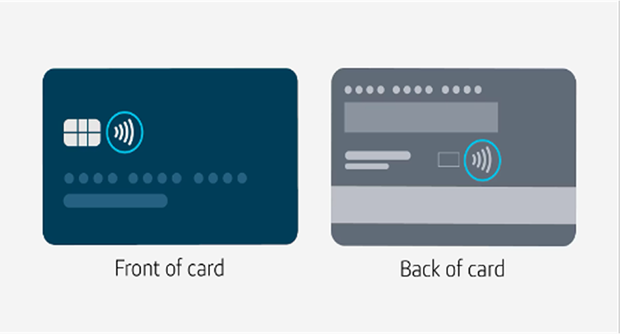
Many banks and financial institutions have switched to contactless cards to make payments safer, faster, and more secure for their customers. Check with your card issuer if you are unsure if your card is contactless-enabled.
If you do not have a contactless card, you have options:
- Link an existing bank card to your smart device.
- Open a safe, inclusive bank or checking account.
- Order a contactless-enabled Cash App Card (no need to have a bank account).
- Can I still ride METRO if I do not have a contactless-enabled card or a payment-enabled device?
Yes. You can still pay for your fare using cash and Splash Pass. You will need to use the farebox to pay your fare, or visit either of our Customer Service Booths in Santa Cruz or Watsonville.
- How do I use my contactless-enabled bank card or payment-enabled device on METRO?
As you board the bus to start your journey, look for the contactless symbol on the Tap2Pay readers:
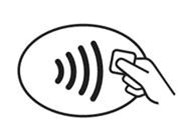
Simply tap your contactless-enabled bank card or payment-enabled device below the screen on the contactless symbol and wait for the green “GO!” screen.
- What are Tap2Pay readers?
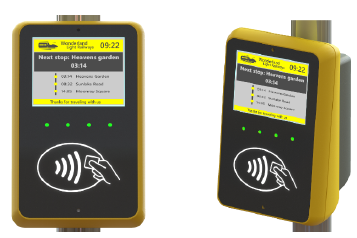
Tap2Pay payment readers are the face of METRO’s contactless fare payment system. The readers serve as point-of-sale terminals, allowing you to pay your fare and enter the system instantly. They are mounted at the front entrance of the bus and look like this:
- Why doesn’t my contactless-enabled bank card work?
If your contactless-enabled bank card is not working, it may be due to one of the following reasons:
- You have a new card. If you have a new contactless-enabled card, you might need to activate it first. If, after activating, your new contactless-enabled card it is still not working, please contact your card issuer at the phone number listed on the back of your card.
- Your card issuer has declined payment. This may be due to your bank account not having enough funds for the journey. Please check with your card issuer.
- Your card may be damaged or expired. If this happens, you’ll need to get your card reissued by contacting your card issuer.
Fares: how are they calculated & charged?
- What will I be charged?
When paying with a contactless bank card or mobile wallet at a Tap2Cruz reader, your fare will be the same as paying with any other method—you can ride up to 2 hours systemwide for only $2 Regular Fare or $1 Discount Fare* when tapping to pay.
- Fares when paying with a contactless payment method
- Is there a weekly or monthly payment option?
Yes, please see the table below for daily and monthly fare-capping amounts when paying with a contactless payment method.
The 31-day cap operates on a rolling basis. This means that a cap will apply for all trips taken within a 31-day period from the first time you tap to pay, and on a rolling basis, based on usage thereafter.
The 31-day period starts with the first tap.
- How do charges appear on my card statement?
The fare is charged to your card’s account and will include the description: “Santa Cruz METRO”
To view your recent METRO rides and see what fare you were charged, visit our Customer Transactions Inquiry Page (or check your bank card statement).
- Is paying via a contactless-enabled bank card or payment-enabled device secure?
Yes. Tap2Cruz transactions are processed through the same secure networks used for all other Visa, Mastercard, Discover, and American Express transactions. Contactless cards are built on secure EMV® Chip technology, which has proven effective at reducing counterfeit fraud. Just like inserting your card, each EMV® Contactless transaction delivers a one-time code to the payment reader that protects payment information and authorizes the transaction with a single tap.
- Will my information be kept private?
Personal data will never be stored, sold, or given away by METRO or any third-party agent. METRO’s Customer Service Representatives do not have access to full credit card account numbers. Customer Service Representatives will answer customer support queries in accordance with Payment Card Industry practices.
- Does my card issuer see my travel history?
No. Just like your card issuer would not see what you order from a coffee shop or other retailer, the issuer will only see the amount of the transaction.
- Will I be charged a service fee for using my contactless payment method on METRO?
No, there are no additional fees to use contactless-enabled payment methods.
- Can I pay for more than one person using one contactless payment method?
No. Each rider must pay with their own contactless-enabled bank card or payment-enabled device.
Tip: If you have both a physical card and a digital wallet version of that same card, they count as different payment methods.
- Do I always have to use the same payment method within the 2-hour transfer window?
Yes. You cannot switch payment methods during the 2-hour transfer window. The fare calculation software will only charge your card $2 throughout this window, no matter how many times it is tapped. If you switch between payment methods during the 2-hour window, it will be treated as a new trip, and you will be charged again.
Important: You must use the same payment method throughout all your trips to qualify for benefits like fare capping, and automatic discount fares (once verified and linked to your card).
- Will it cost more to use contactless payments?
No. Fares paid via contactless payment will never cost more than the standard Fixed Route fares and will be capped at daily and 31-day amounts, allowing you to pay as you go up to the fare cap.
Please review the fare chart for Tap2Cruz fare capping information.
- Do I need to tap on each bus I board within that 2-hour window?
Yes, you must tap on a contactless payment reader on each bus you board. The fare calculation software will keep track of your taps and only charge you $2 regardless how many times you tap. You will not be charged again until 2 hours have passed.
- Are discounted fares available with contactless payment?
Discounted contactless fares are now available for older adults (ages 65+), Veterans, and Medicare cardholders via a simple, digitized verification program that enables riders to apply for and receive fare discounts.
See our Benefits page to learn how to enable these fares, or click here to link your card today!
Riders who are eligible for a discount fare can still pay the existing discount fare with cash or SmartCard when boarding a bus; you’ll pay at the farebox instead of using the contactless payment reader.
Troubleshooting Issues
- What can I do if my payment was not accepted at the payment reader?
If you tap your contactless card or payment-enabled device and the payment reader indicates that the payment was not accepted, you will need to use another payment method to pay for your ride. Your payment may not be accepted for a few reasons:
- It is possible that your payment method has been blocked if we have not received payment for a prior fare. Until payment is received for that fare, that payment method will remain blocked, even if you use other payment methods in the meantime
- Your payment method has been blocked by your bank
- Your card or smart device is damaged
- Your card is not contactless-enabled
- You may not have enough funds
To resolve an issue with your card, please contact your bank. In the meantime, you can use another contactless debit or credit card, including a card in your mobile wallet. If you are having trouble with your payment-enabled device, you may need to remove the card from your device and add it back in.
- How can I get my blocked payment method accepted again?
Once you have resolved the issue with your payment method, it can take up to 15 minutes before you can continue to use the same payment method at METRO payment readers.
- What is “card clash?”
Card clash happens when more than one payment method touches the payment reader at the same time. The payment reader may deduct the fare from the wrong bank card/device as it reads the first payment method it comes in contact with or it will not read either card. It is recommended that you present one payment method when paying your fare.
Note: If you are paying for someone who is traveling with you, you will need to use a different card or device, or an alternative form of fare payment.
- How do I apply for a refund?
If you suspect you have been charged more than once or have not been charged the correct fare, please contact METRO Customer Service at (831) 425-8600, daily, 8 a.m. to 5 p.m.
- How do I dispute a charge?
If you did not authorize a charge, or if you believe that you have been charged incorrectly, you can dispute a charge by speaking with a METRO Customer Service representative at (831) 425-8600, Monday through Friday, 8 a.m. to 5 p.m.
- What if my payment method is lost or stolen?
- If your card is lost or stolen, contact your bank first to ensure that your card is canceled and to prevent unauthorized transactions.
- If your card is found, and if your bank did not cancel it, you may continue using your card.